How To Remove One Operating System From Dual Boot Windows


In this age all people know that we can install two or more operating systems on the same partition or on same hard drive. For example you can install windows 98 with windows 2000 or Windows XP and also windows XP with Windows vista. You can install both operating systems on the same partition (both on C: drive) or on different partitions (one operating system on C drive and other on D drive). But installing more than oneoperating system on same drive kill the system performance.
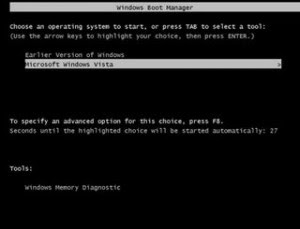

In dual operating systems, when you turn on the computer, it gives you a choice of windows 2000 or windows XP to use. Whether you have installed your both operating systems on C drive or one on C drive and other on D drive, system store the root files of the both operatingsystems on C drive, so you can delete one any operating system with editing these root files. There is no any direct method to uninstall one operating system; you can do this only with format the partition or delete windows folder after editing the “Boot.ini” file.
The given steps to edit the Boot.ini to delete one operating system:
    In case any problem after editing, first backup the Boot.ini file.

    1. Click Start button then type sysdm.cpl in Run option then press Enter for next. 2. Now on the Advance tab, click on Setting under the Startup and Recovery area. 3. Under the System Startup area, click on Edit button, and you will get a Notepad editable file. 4. If you have installed two operating systems (windows XP and Windows 2000) on same hard disk then it will look as in Boot.ini. “[boot loader] timeout=30 default=multi(0)disk(0)rdisk(0)partition(1)WINDOWS [operating systems] multi(0)disk(0)rdisk(0)partition(1)WINDOWS=”Windows XP Professional” /fastdetect multi(0)disk(0)rdisk(0)partition(2)WINNT=”Windows 2000 Professional” /fastdetect”
According to above example, if you want to delete windows 2000 then delete the “multi(0)disk(0)rdisk(0)partition(2)WINNT=”Windows 2000 Professional” /fastdetect” line and save the file.
But if you want to delete windows XP then delete the “multi(0)disk(0)rdisk(0)partition(1)WINDOWS=”Windows XP Professional” /fastdetect” line and save the file.
At the end delete the operating system folder that you no longer require or format the drive where the other operating system contains.Now close the all programs and restart your computer after any changes to go into effect.
Do tell us how you liked the post and if you were able to make it work.
Any suggestions or comments are welcome.

[Read More...]


Hack Password Of Any Windows Based Operating System !!


Windows is the most popular operating system in use today. People use passwords in an attempt to keep their data secure from intruders such as hackers. But hacking the password of any version of windows is now just like a child’s play. Well for that the expertise needed is almost none and the time taken, merely 10 seconds. Heres the trick:-


Their is a free utility named Ophcrack which makes the whole process of discovering the logon password easy. Ophcrack is a free Windows password cracker based on rainbow tables. It is a very efficient implementation of rainbow tables done by the inventors of the method. It comes with a Graphical User Interface and can solve passwords up to 14 characters in length. All you have to do is :-
  • Simply download the Ophcrack ISO from here and burn it to a CD
  • Insert the CD into a machine you would like to gain access to, then press and hold the power button until the computer shuts down
  • Turn the computer back on and enter BIOS at startup. Change the boot sequence to CD before HDD, then save and exit.
  • Wait for the computer to restart and Ophcrack to load, all work done just save the password it gives you and try logging in with that password.
P.S :- The idea is strictly for personal use and knowledge. We do not advice you to use the method for the purpose of hacking.

[Read More...]


Crack Windows Password Instantly


Windows Password Crack
Have you ever tried to log into a Windows computer for a few minutes and you finally realize that you forgot the password?


There’s a way to crack the password and it doesn’t involve reformatting and reinstalling Windows.

The solution is called @stake LC4 (formerly L0phtCrack), however since Symantec stopped development of L0phtcrack, I’m going to let you in on a program called LC5.

Just like L0phtCrack, LC5 attacks your Windows machine with a combination of dictionary and brute force attacks.

LC5 can crack almost all common passwords in seconds. More advanced passwords with numbers and characters takes longer.

The main purpose of the LCP program is user account passwords auditing and recovery in Windows NT/2000/XP.

I haven’t tested it against Windows Vista yet, so I’m not sure if it will work. Your mileage may very either way.

How it works:-

Windows NT, 2000 and XP passwords are stored as encrypted hashes. LC5 attacks these hashes with hundreds of passwords per minute.

Eventually the correct password will be sent and then displayed to the screen.

Good intentions:

System administrators can find weak passwords within minutes. Sys admins can then change the passwords to make them more secure.

LC5 can be used to access computers of users who forget passwords.

In companies, it can be used to access computers of employees who have left the company.

Bad intentions:

Hackers can use LC5 to sniff passwords over networks.

Hackers can install this application onto a primary domain controller and steal hundreds of passwords within minutes.

Please note that I am not the author of this software. Be advised that if you use this software, you do so at your own risk without any warranty.

Download LC5 (v5.04):


  • English version (with installer) – 2.29 MB

  • English version (without installer, ZIP) – 1.86 MB

  • English version (without installer, RAR) – 1.66 MB


  • Software License: LCP is a freeware program. The program may be distributed under condition of saving all files contents and structure of installation package.

    Instant Solution to Login To Windows

    There is another solution that works instantly to remove all Windows Passwords. It will Remove, Unlock and Bypass lost/forgotten passwords including Administrator for Windows Vista, 2000, 2003 XP and NT.

    [Read More...]


    Recent Comments

    logo

    Award Winning Computer Users Blogs - BlogCatalog Blog Directory

    About Me

    About Me

    Subscribe

    Popular Posts

    Return to top of page Copyright © 2011 | Platinum Theme Converted into Blogger Template by HackTutors